[ GUIDE ]
Use LUTly LUTs in DaVinci Resolve
Export from LUTly, install, apply. Three steps and one setting that matters.
[ STEPS ]
STEP 01
Export your .cube files from LUTly.
EXPORT FROM LUTLY
STEP 02
Project Settings > Color Management > Open LUT Folder. Copy the .cube files in.
OPEN LUT FOLDER
STEP 03
On the Color page, open the LUTs browser, right-click and Refresh. Drag your LUT onto a node.
LUTS BROWSER, NODE
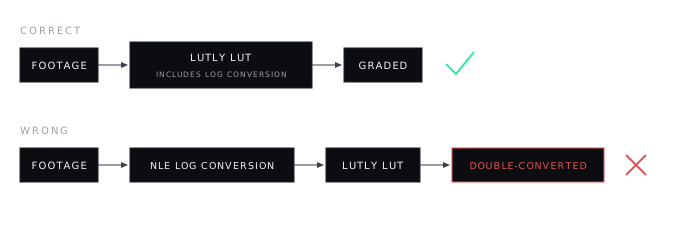
LUTly LUTs include the log conversion. If your project uses colour management or an input colour space that converts log automatically, bypass it for these clips. Two conversions make the grade look wrong.
[ FAQ ]
Frequently asked.
Why does the grade look washed out or doubled?
Resolve's colour management is converting the log footage before your LUT. Bypass the input colour space for these clips; the LUT contains the conversion.
Node or clip LUT?
A node on the Color page gives you control; right-clicking a clip thumbnail works too.
Does this work in the free version?
Yes.
[ MORE GUIDES ]