[ GUIDE ]
Use LUTly LUTs in Premiere Pro
Export from LUTly, install, apply. Three steps and one setting that matters.
[ STEPS ]
STEP 01
Export your .cube files from LUTly.
EXPORT FROM LUTLY
STEP 02
In Lumetri Color: Basic Correction > Input LUT > Browse. Pick your .cube.
LUMETRI > INPUT LUT
STEP 03
For many clips, put the LUT on an adjustment layer above them.
ADJUSTMENT LAYER
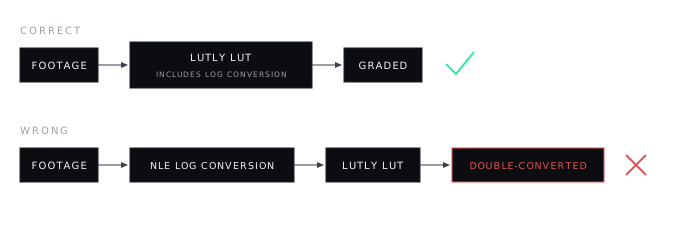
Do not stack the LUTly LUT on top of a separate log interpretation or a second input LUT. One conversion, done once.
[ FAQ ]
Frequently asked.
Input LUT or Creative Look?
Input LUT. The LUTly file contains the log conversion, which is Input LUT's job. Creative Looks sit on top of already-corrected footage.
Why does my footage look grey without the LUT?
Log footage is flat by design. The LUT contains the conversion that restores contrast and colour.
One LUT on many clips?
Use an adjustment layer above the clips.
[ MORE GUIDES ]